Whisper Stories Cancel Subscription
How to Cancel Your Whisper Stories Subscription (Step-by-Step Guide)
Want to cancel your Whisper Stories subscription? You can do it in about a minute, and you don't need to contact anyone. This guide shows exactly how to cancel Whisper Stories on the website, on Android (Google Play) and on iPhone (App Store).
Quick answer: to cancel your Whisper Stories subscription, log in to your account, open your subscription settings and select Cancel subscription. If you subscribed through Google Play or the Apple App Store, cancel in your store's subscription settings instead.
You keep full access to all Whisper Stories audio stories until the end of the period you already paid for.
You can always request subscription cancellation by contacting our support team at hello@getmywhisper.com.
Before You Cancel: Log In to Your Whisper Stories Account
To cancel your Whisper Stories subscription, you first need to log in to your account. Choose the option that matches how you use Whisper Stories:
- On the website: go to the login page and sign in with the email and password you used when you subscribed.
- On Android: open the Whisper Stories app, or open the Google Play Store app and go to your subscriptions (see the Google Play section below).
- On iPhone / iPad: open the Whisper Stories app, or open your Apple ID subscription settings (see the Apple App Store section below).
Not sure which email you used? Check your inbox (and spam folder) for your Whisper Stories receipt or welcome email. Forgot your password? Use the Lost password? link on the login page to reset it.
How to Cancel Whisper Stories Subscription on the Website
If you subscribed on the Whisper Stories website, follow these steps to cancel your subscription:
- 1
Go to the login page and log in with your email and password.
- 2
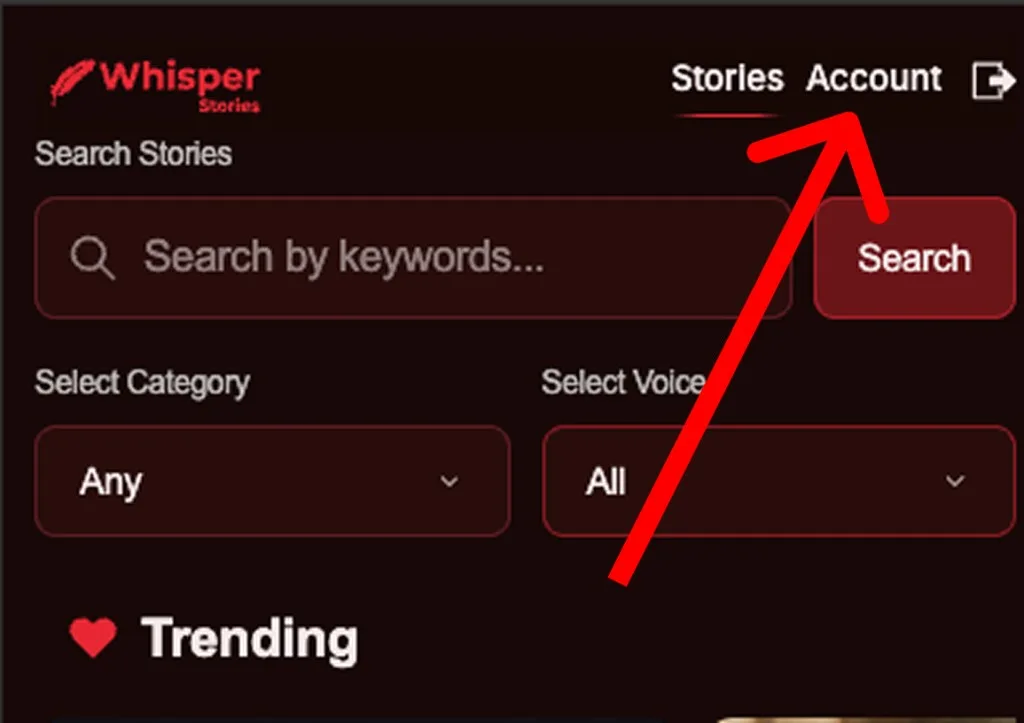
Open Account.
- 3
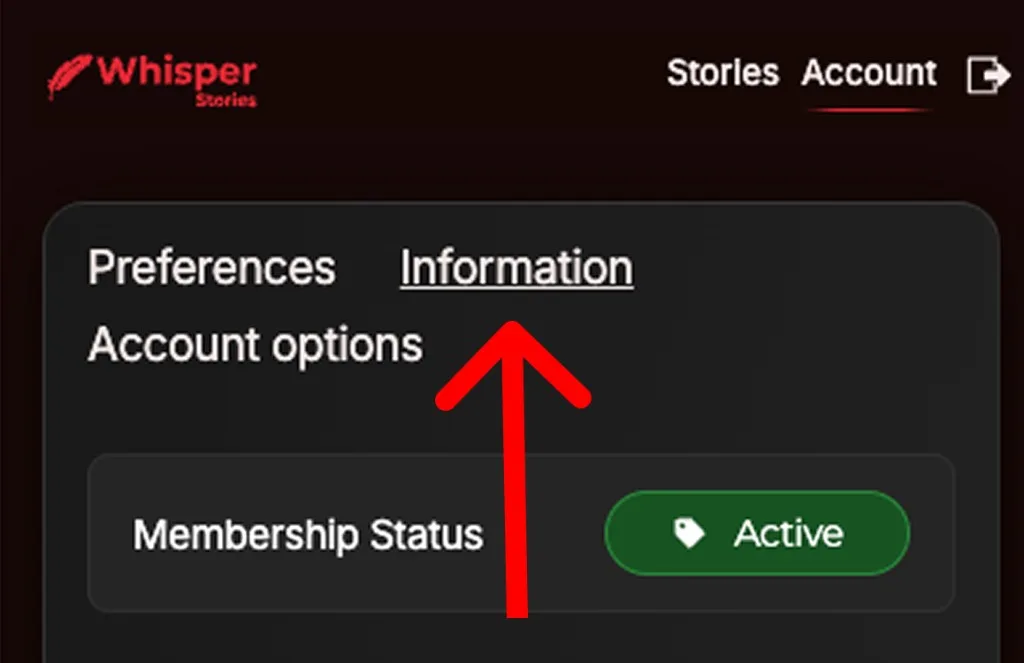
Select Information.
- 4
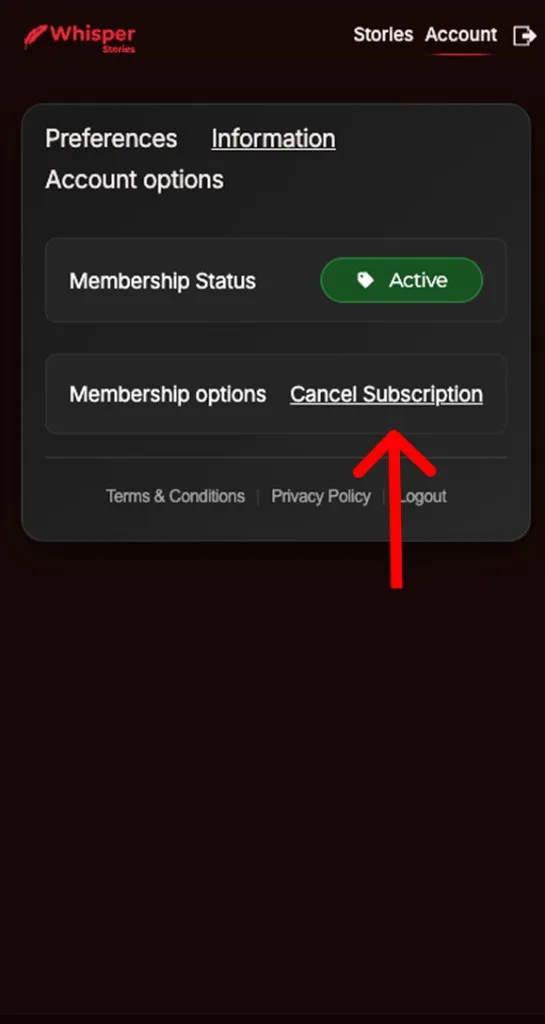
Click Cancel Subscription.
- 5
Confirm the cancellation when asked.
- 6
Check that you received a cancellation confirmation by email, and that your plan shows as cancelled or set to expire.
Tip: keep the confirmation email. It is your proof that your Whisper Stories subscription was cancelled.
How to Cancel Whisper Stories in the App
If you are already logged in to the Whisper Stories app on Android or iPhone, open Account, select Information, and tap Cancel Subscription. If the app does not show a cancel option, your subscription was bought through Google Play or the App Store, so cancel it there using the steps below.
Cancel Whisper Stories Subscription on Google Play (Android)
If you paid through Google Play, you must cancel there. Deleting the app does not cancel your subscription.
- 1
Open the Google Play Store app on your Android phone.
- 2
Tap your profile icon in the top right corner.
- 3
Tap Payments & subscriptions, then Subscriptions.
- 4
Select Whisper Stories.
- 5
Tap Cancel subscription and follow the on-screen steps.
- 6
Make sure you are signed in to the same Google account that you used to subscribe.
Cancel a google play subscription
Cancel Whisper Stories Subscription on iPhone (Apple App Store)
If you paid through Apple, cancel in your Apple ID settings:
- 1
Open the Settings app on your iPhone or iPad.
- 2
Tap your name at the top, then tap Subscriptions.
- 3
Select Whisper Stories.
- 4
Tap Cancel Subscription and confirm.
- 5
Make sure you are signed in with the same Apple ID that you used to subscribe.
Cancel an App Store subscription
What Happens After You Cancel Your Whisper Stories Subscription
- You keep access to Whisper Stories until the end of your current billing period.
- You will not be charged again after cancelling.
- You can resubscribe at any time by logging in to your account.
- Refunds: refund policy.
If you cancel your subscription through the app or website (not through the App Store), please make sure you receive an email confirming that your subscription has been successfully canceled.
Whisper Stories Cancel Subscription: FAQ
How do I cancel my Whisper Stories subscription?
Log in to your account, open your subscription settings and select Cancel subscription. If you subscribed through Google Play or the App Store, cancel in your store's subscription settings.
Can I cancel Whisper Stories anytime?
Yes. You can cancel your Whisper Stories subscription at any time, and you keep access until the paid period ends.
Why am I still being charged after I deleted the app?
Deleting the app does not cancel your subscription. You must cancel it in your account, Google Play or the App Store.
I can't find my Whisper Stories account. What should I do?
Try logging in with each email address you may have used, and check your inbox for your receipt. If you still can't find it, contact support.
How do I get a refund?
See the refund policy.
How do I contact Whisper Stories support?
Email hello@getmywhisper.com with the email address linked to your account, and we will help you cancel.